
You load 16 tons, what do you get?
Sixteen Tons, song by Tennessee Ernie Ford
Another day older and deeper in debt
St. Peter, don’t you call me ’cause I can’t go
I owe my soul to the company store
Overview
In this section, I will describe the process of DIY tactical investing. Starting with the signals, via setting up your brokerage account, to the regular rebalancing routine. At first, this might all look intimidating, but trust me: it becomes second nature very quickly.
Trading Signals
At the core of tactical investing is an investing strategy. Whenever this strategy requires re-shuffling of the current holdings, it issues a signal indicating the new account allocation.
There are two basic routes to obtain these signals:
- Calculate your own
- Subscribing to a signal service
Calculate Your Own
Especially readers with a software affinity may be tempted to code up trading strategies found in the public domain and run them on their own hardware. There is nothing wrong with that, and after all that is exactly how I got started. However, it is easy to underestimate the effort involved with doing so.
Backtesting Engine
First, you need a software platform to run algorithms on. There are many suitable backtesting engines out there, both open-source and commercial. Commercial tools include TradeStation, MultiCharts, NinjaTrader, and Amibroker, just to name a few. All of these tools seem to have one thing in common: they are aimed at single-asset trading strategies, and the code quickly becomes quite convoluted when dealing with multiple assets.
On the open-source side of things, there are also quite a few options available, including TuringTrader, Backtrader, and QuantConnect. I’d like to single out TuringTrader here. Not because I developed it, but because I specifically designed it to make running the type of strategies suitable for DIY investors as simple as possible. Furthermore, it comes with quite a few showcase strategies, that you may run out of the box, or use as starting point for deeper education, and your own experiments.
Asset Quotations
But the software is only one piece to the puzzle. We also need asset current and historical asset quotations to feed into our strategies. Again, there are a lot of choices out there, both commercial, and free. Some sources include IQFeed/ DTN, Norgate, Tiingo, or Stooq.
They various data feeds differ in their resolution, e.g. daily, vs. hourly, minute, or tick-based quotes. There are also differences in the timing of their publishing. Some are published in real-time, while others are only available several hours after the markets closed. Further, data feeds differ in the available history. Some offer only a few weeks, while others provide ten or even more years. And finally, there are differences in the way the quotes reflect corporate actions. Some providers only provide the market prices, while others are back-adjusted for splits and dividends.
So yes, there are a lot of aspects to consider. To make things even worse, most backtesting engines are quite picky and only support a small handful of providers – and not necessarily the ones you might prefer.
The important takeaway here is, that most beginners forget about the crucial aspect. Data feeds must not be an afterthought but need to be considered on day one. To create reliable signals, you absolutely need high-quality data. Make sure you can use these out-of-the-box and without the need for additional curating.
For the strategies we are considering here, you need:
- end-of-day quotes, with opening, high, low, and closing prices.
- quotes fully adjusted for splits, dividends, and interest payments
- includes all asset types you will be trading
- several years of history
- published within a few hours of market close
Unfortunately, good data rarely come for free, and you get what you pay for.
Strategies
It should be quite clear that you need a trading strategy. There are many publications out there, sharing in-depth detail about the mechanics of trading strategies. But coding these up may become more of a burden than you initially might think. In my experience, there are always important details missing in the description of the strategy rules. This might be the exact sequence how the rules are applied, or the precise formula used to calculate a certain indicator. But the truth is: you will typically have additional questions.
What follows then, is a lot of experimentation, to first try and replicate the author’s results. And once you are that deep in the code, you will likely want to try a few of your own ideas and see if you can improve upon the results. And before you know it, you have spent weeks fiddling with development, when all you wanted to do is invest.
Maintenance & Reliability
Once you’ve run your strategy for the first time and with satisfactory results, you might think you reached the finish line. But, again, reality is much harsher than that. Investing is a long-term play, and you will want to run this strategy 252 days a year (assuming you are trading US stocks. There is a lot to consider:
- You will need to be available at the time you are supposed to trade; typically when the US stock exchanges open. That is every day, even when you are on vacation, or sick.
- Maintaining software for years comes with its own challenges. There might be an update to your operating system, or your backtesting engine causing issues. Your algorithm might have a rare bug, that is only triggered by today’s special circumstances. Or, the asset you are trading is no longer available.
- You will also find that you rely on a lot of infrastructure, that you cannot take for granted. You might experience a power-outage, or internet failure. Your data provider might have delivered faulty data or no update at all.
The important take-away here is again: calculating signal every day is very different from calculating them just once. It is a long-term commitment of time and energy. And I know what I am talking about, I’ve been doing exactly this since 2011. In this time, I have seen many different things go wrong or break. Oftentimes, these issues kept me scrambling to put my trades in, sometimes requiring fixes taking multiple hours to implement.
For these reasons, I cannot recommend running your own signals – unless you can really make the commitments in time and effort necessary to do so. Yesterday, today, and in the foreseeable future.
Subscribing to a Signal Service
Instead of calculating your own trading signals, you can, of course, also subscribe to a signal service. They will charge you a fee, and in return take care of almost all of the issues and complications detailed above.
Signal services exist in many different forms. There are single-asset strategies, often trading stock index funds, or futures. There are stock-picking services, investing in high-flying stocks, and there are asset-rotation strategies, investing in broader stock and bond indices. Some of these strategies require intraday trading, others only trade daily, weekly, or even monthly. Most of these strategies are closed-source and only offer very vague insight into their operation, while others explain their operation in great detail.
Whatever you chose, make sure you:
- don’t get blinded by fancy claims and high returns
- understand the investment risks, especially when dealing with futures, options, crypto, or leveraged assets
- have satisfactory information about the strategy’s internal operation
- agree with the strategy’s basic assumptions
- have the stamina to meet the strategy’s maintenance requirements
With all of this in mind, here is an incomplete list of signal services that might fit your bill: Invest-Like-a-Pro.com, TuringTrader.com, SectorSurfer.com, AllocateSmartly.com, and TheTradeRisk.com.
Investment Account
Your investment account typically lives at a broker/dealer, who acts as the custodian for your funds and assets, and facilities any trading activity. Most people have multiple investment accounts:
- a 401(k) account with your current employer
- a roll-over IRA, holding the 401(k) investments from previous employers
- a cash account, either personally, joint or both, for investments with no preferential tax treatment
Some people also have Roth IRA accounts, allowing them to put in after-tax money, but with tax-deferred treatment of any gains.
There are many brokerages to choose from, here is an incomplete list: Schwab, Fidelity, Interactive Brokers, Alpaca, Tradier, and RobinHood.
If you are using your brokerage account much like a bank account, there really is not too much of a difference between the various brokerages. All of them allow you to transfer funds and positions, and to execute orders online, or through a mobile app.
But when it comes to more sophisticated software support, including trading platforms and API access, there are massive differences. Luckily, for Invest-Like-a-Pro.com, we don’t need any fancy features.
It is important to understand that, while we are entering trades in real-time, and can see the account values changing immediately, these trades are not processed instantaneously. Instead, your brokerage uses T+2 Settlement, with the trades settling and becoming final two full days after the trade date.
As your account will show you the new balance immediately after executing the trade, you might believe this doesn’t matter. Unfortunately, it does: there are settlement violations that may occur because of the T+2 Settlement.
- A Good Faith Violation occurs, when you are buying a security with unsettled funds, only to sell it, before those funds settle.
- A Free Riding Violation occurs, when you buy a security and then sell it to pay for itself.
- A Liquidation Violation occurs, when you buy a security, then sell another security after the purchase to cover the cost.
These violations may lead to your account being restricted to settled-cash trading only for 90 days.
Due to the nature of tactical investing, these violations may occur when rotating assets. The easiest way around this is to make sure that all your brokerage accounts are Margin Accounts, meaning you can borrow cash from the brokerage, if needed to fund assets.
It is important to understand that none of Invest-Like-a-Pro.com‘s strategies require leverage from the broker. So, we never use the margin to create more than 100% exposure. We will only use the margin to avoid settlement violations.
Rebalancing Routine
With signals available and our brokerage account set up, we are ready to invest and maintain our investment accounts.
We start the routine no earlier than six hours after the markets closed, but before the market opens on the next morning. Invest-Like-a-Pro.com needs this time to allow the data provider to update and adjust their quotes, and to recalculate the site with all the portfolio holdings.
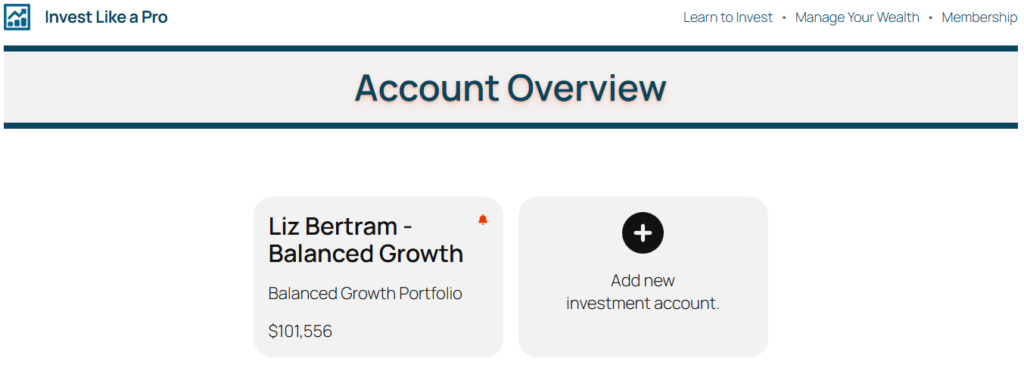
First, we check the Account Overview page, which lists all of our investment accounts. If there is a little bell icon in the top right corner of the account, we’ve got work to do. At a later stage, Invest-Like-a-Pro.com will also send you an email, whenever your account needs attention, and we proceed to the next step. Otherwise, we can stop right here.
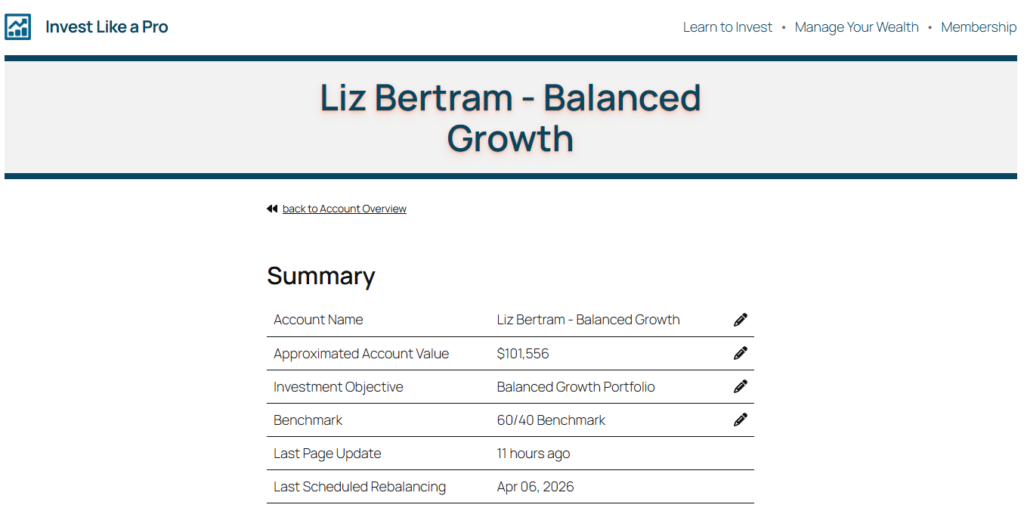
Next, click on the account tile, to open the account. At the top of the page, you’ll find the account summary. There are a few things to check here:
- Verify that the Approximated Account Value matches what your brokerage reports. The amount shown by Invest-Like-a-Pro.com should never be larger than the amount shown by your brokerage. It is advised to adjust such, that it is a couple hundred dollars less, just to be safe.
- Double-check that the Last Page Update is only a few hours old. If it is older than that, the page has likely not updated, yet. In this case, retry in an hour or two.
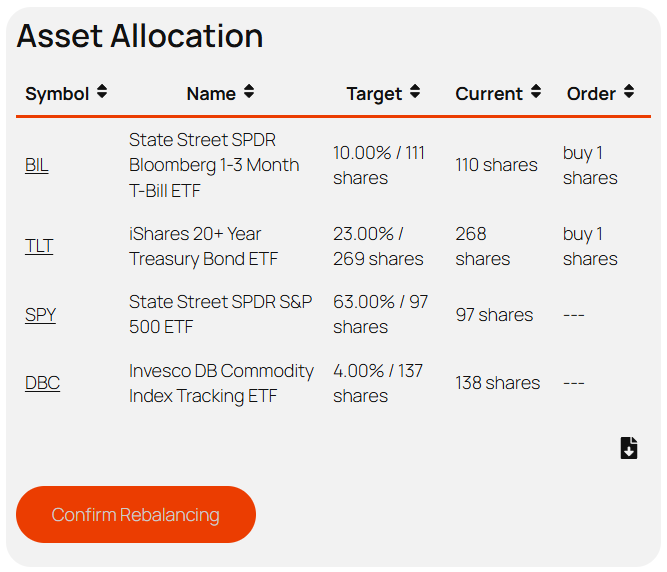
Next, check out the asset allocation table. This table will show you the target allocation for each asset, along with the number of shares you likely have in your account right now, and the order you need to place.
Confirm that the numbers shown in the Current column match the values at your brokerage. If so, you can enter the orders as shown in the Order column. Otherwise, subtract the number of shares shown at your brokerage from the number shown in the Target column. If the result is positive, buy that number of shares, otherwise sell accordingly.
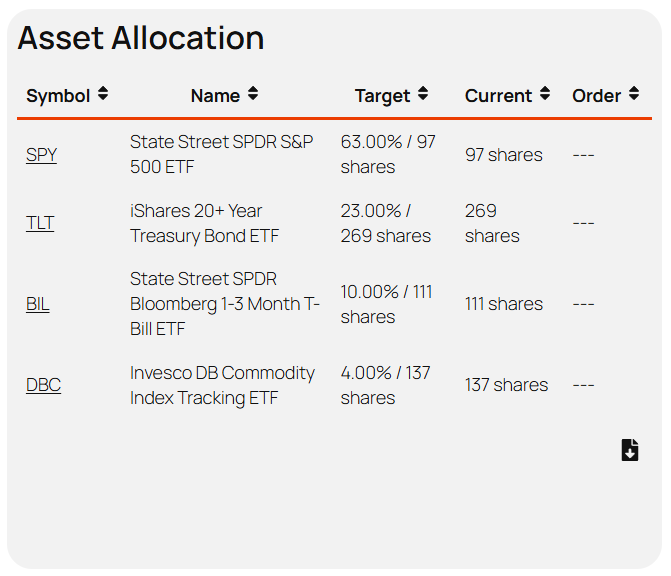
Once you have entered all the trades, click the Confirm Rebalancing button. This updates the Current column to match the Target column. As a result, it clears the Order column and turns off the bell on the Account Overview page.
And that’s it! With just a little bit of practice, you should be able to perform this routine in less than five minutes per account.